

不限模块数,信息图就会变成海报
信息图翻车,通常是因为没写模块数量、图表类型和短标签。四个格子、一行字,比十二段正文稳。
2026/09/01
本指南覆盖的控件
相关模板
在画廊中浏览信息图与图表
Create a clean, child-friendly educational vocabulary poster for preschool/kindergarten children, inspired by a simple visual learning card. Feature [FRUIT] as the main large realistic object on the left, and show a [PART / SLICE / SEGMENT] of the same fruit on the right. Connect the two with a playful dotted curved arrow and a tiny simple stick-figure child pointing toward the smaller part. Add the word “[FRUIT NAME]” in large bold uppercase letters at the top and “[PART NAME]” in large bold uppercase letters underneath the smaller image. Use a soft white and very light pastel-blue background, rounded image panels, clean spacing, realistic fruit photography, simple blue typography, and minimal playful illustrations. The overall design should feel bright, educational, modern, uncluttered, and easy for young children to understand, like a premium preschool vocabulary learning card. Vertical 4:5 composition, high resolution, soft lighting, clear labels, no unnecessary decorations.

Create a premium square “reference-style sustainable transportation infographic” centered around a futuristic electric city bus called the {E_BUS_NAME}, designed as a beautifully curated urban-mobility handbook page rather than a commercial vehicle advertisement. The composition should feel like a modern visual encyclopedia mixed with an elite public-transit engineering guide and high-end editorial infographic system. Visual Direction • 1:1 square composition • Premium smart-city background with subtle transportation blueprints, circuit-inspired overlays, and urban infrastructure schematics • Elegant palette using deep navy, graphite black, electric green, steel gray, and soft cyan accents • Refined editorial typography hierarchy • Rounded modular information cards with clean spacing • Gentle realistic reflections and premium transit-system dividers • Minimal transportation engineering iconography • Extremely detailed central electric bus render viewed in dramatic three-quarter perspective driving through a futuristic smart-city boulevard • Thin precision annotation lines pointing toward key systems and technologies • Clean, organized “knowledge-first” layout with high information density but breathable spacing Main Subject Presentation A stunning ultra-detailed realistic render of the {E_BUS_NAME} placed at the center, featuring: • sleek aerodynamic body design • panoramic windshield • illuminated destination display • low-floor accessibility layout • futuristic LED lighting systems • premium electric drivetrain details • realistic urban reflections • smart-city transportation realism Surround the bus with engineering callouts explaining: • battery pack technology • electric motor system • regenerative braking system • charging infrastructure compatibility • smart fleet management systems • passenger accessibility features • thermal battery management • energy-efficiency technologies • safety monitoring systems • intelligent driver assistance features Include Modular Sections • E-Bus Overview • Technical Specifications • Vehicle Dimensions & Capacity • Powertrain & Energy System • Battery Technology Breakdown • Charging Solutions • Passenger Comfort Features • Safety & Reliability Systems • Fleet Management Technology • Environmental Impact Analysis • Operating Cost Comparison • Construction & Material Engineering • Sustainability Lifecycle Assessment • Smart-City Integration • Global Adoption Trends • “Did You Know?” Facts Section • Future of Electric Public Transport Add Premium Visualization Modules • battery architecture diagrams • charging workflow graphics • energy-consumption charts • passenger-capacity visualizations • smart-city integration maps • drivetrain cutaway illustrations • environmental impact comparisons • fleet-management dashboards • vehicle blueprint dimensions • lifecycle sustainability graphics Style Keywords “premium transportation encyclopedia” “editorial electric mobility handbook” “high-end public transit infographic” “scientific transportation poster” “museum-quality electric bus reference page” “modular smart-city knowledge system” “clean engineering editorial design” “ultra-detailed mobility visualization” “future transportation showcase” “sustainable urban mobility design” Avoid • generic vehicle advertisements • cluttered commercial brochure layouts • cartoon transportation styling • unrealistic flying-bus concepts • excessive cyberpunk neon overload • low-detail stock-vehicle renders Final Goal The final result should resemble a professionally published transportation-engineering reference-book page created for urban planners, transportation engineers, sustainability researchers, architects, public-transit authorities, and smart-city enthusiasts, combining technical accuracy, sustainability insights, and premium editorial design.

《导览式科普绘本》提示词: 请根据【主题】创作一张高完成度的「导览式科普绘本」风格插画。 这是一张结合“大型场景主视觉 + 导览路线 + 可爱导览 IP + 知识站点 + 儿童科普绘本质感”的场景导览式科普图解页。画面需要让观者像被带着参观一个复杂系统一样,边看边理解主题背后的运行逻辑、空间结构、流程关系和关键知识点。 【基础设定】 主题:【填写主题,例如发射场的一天 / 一个集装箱的旅行 / 地铁站里的秘密路线 / 下潜到深海的一小时 / 机场如何运转 / 医院急诊系统 / 智慧农场 / 消防站出警流程】 画幅比例:【4:3 横版】 主色调:【根据主题自动匹配,整体保持明亮、清爽、儿童友好】 风格方向:【现代儿童科普绘本 / 场景导览式图解 / 高完成度数字插画】 【核心表达】 请围绕【主题】设计一个完整的大型场景或复杂系统。画面中必须有一个明确的主视觉场景,例如大型设施、交通系统、科技装备、自然探索场景、城市公共系统或生产流程。主体要足够清晰、有规模感、有细节,能够成为第一眼的视觉中心。 画面要通过“导览路线”的方式组织信息,避免仅把场景做成静态陈列。请设计一条清晰的参观路线、流程路线、时间线或空间动线,让读者可以沿着路线一步步理解这个系统是如何运行的。 【导览 IP 设计】 请为本图设计一个原创、可爱、亲和的导览小 IP。导览 IP 可以是小动物、小朋友、拟人化工具或其他适合主题的原创形象,但必须具有独立原创性,不要照搬任何参考图中的角色、动物形象、服装、配色或搭档关系。 导览 IP 的作用是: 1. 开场介绍主题 2. 指向关键知识点 3. 引导读者顺着路线阅读 4. 增加儿童绘本的陪伴感和趣味性 导览 IP 可以在画面中出现 2-3 次,但不要过度抢主视觉。角色应圆润、可爱、有表情、有动作,适合儿童科普绘本。 【信息结构】 画面中请设置 3-6 个“知识站点”,每个站点用简短中文标签和短说明表达。站点命名可以采用: - 第1站|xxx - 第2站|xxx - 重点观察|xxx - 小知识|xxx - 为什么|xxx - 如何工作|xxx 每个知识点都要围绕主题的核心运行逻辑展开,不要写空泛说明。文字要短、清楚、自然,避免长段落,适合儿童阅读。 【画面模块】 整张图建议包含以下模块: 1. 顶部主标题区:清楚写出主题名称 2. 开场导览区:导览 IP 引出主题 3. 大型主场景区:展示主题系统的完整场景 4. 导览路线区:用箭头、虚线、路径、时间节点或流程线串联知识点 5. 知识站点区:用小信息框、导览牌、局部标注展示关键知识 6. 小百科 / 小贴士区:补充一个有趣知识 7. 收尾区:让导览 IP 做简短总结或引导 【构图要求】 画面采用 4:3 横版构图,整体像一本高质量儿童科普绘本的跨页,也像一张儿童科技馆导览图。画面需要有清晰的视觉重心:大型主场景占据主要空间,导览路线贯穿画面,知识模块自然分布在周围。信息丰富但不能杂乱,阅读路径要顺畅。 【视觉风格】 整体采用现代儿童科普绘本风格: - 明亮、清爽、干净的色彩 - 清晰自然的手绘线条 - 高完成度数字插画质感 - 细节丰富但有秩序 - 可爱但不低幼 - 有科普图解感 - 有导览地图感 - 场景真实可信,但表达方式亲和 【文字与标注】 文字以中文为主,使用短标题、短标签、简短说明。不要生成大段复杂文字。信息框应像儿童科普书中的导览牌、知识卡片或小贴士。文字要尽量清晰、简洁、可读。 【最终目标】 让整张图像一页高质量的儿童科普绘本:孩子第一眼被可爱角色和大场景吸引,第二眼能顺着路线读懂系统如何运行,第三眼还能继续发现细节和知识点。画面要具有系列化潜力,方便后续替换不同主题继续创作同类型图片。

《黑色丝袜图鉴款式单图》提示词: 请基于同一套「黑色丝袜 / 吊带袜图鉴」系列风格,继续生成 8 张对应单款的独立展示图。 【系列要求】 - 这些图片必须和已完成的总览图鉴属于同一个系列 - 整体版式、字体、色调、背景、质感、排版逻辑保持一致 - 都是竖版、高完成度、暖白 / 浅灰白背景、轻奢女性向时尚图鉴风格 - 每一张都像同一个品牌或同一套视觉系统下的延展页面 【每张单图的共同结构】 1. 顶部标题区 - 英文系列标题:BLACK GARTER GUIDE - 中文主标题:黑色丝袜 / 吊带袜单款展示 - 当前款式名称:__________ - 一句简短副标题:突出该款式的核心特点 2. 中部主体区 - 以 1 位成人女性模特穿戴展示为主 - 重点展示对应款式的关键细节: - 经典蕾丝款:袜口蕾丝、优雅氛围 - 细网眼款:网格纹理、轻盈通透 - 波点款:波点图案、复古俏皮 - 后缝线款:背后缝线、线条感 - 竖条纹款:纵向条纹、修饰腿型 - 交叉绑带款:绑带结构、设计感 - 极简透肤款:透明感、基础百搭 - 花纹蕾丝款:花纹装饰、浪漫氛围 - 每张图的人物长相、发型、姿势、镜头角度要不同,但都要保持高级、真实、性感、写实 - 允许使用站姿、坐姿、交叉腿、倚靠、回眸等不同姿势 - 画面要有立体感、阴影层次和高级编辑感 3. 注释区 - 每张图都要保留 3 到 5 条手绘式标注 - 可以使用箭头、短线、圈注、手写风标签 - 标注内容要围绕该款式最关键的细节,比如: - 袜口结构 - 花纹纹理 - 透明度 - 缝线位置 - 绑带方式 - 腿部线条效果 - 标注文字简洁、清楚、统一风格 4. 底部信息区 - 加入简短的 “Style Notes / 风格速记” - 用 1 到 2 句说明该款适合的场景和氛围 - 保持简洁,不要抢主体 【统一视觉要求】 - 保持和总览图鉴完全统一的整体视觉系统 - 背景统一为暖白、浅灰白或奶白 - 风格统一为高级、干净、时尚图鉴感、轻奢女性视觉 - 模特必须真实、立体、写实、自然肤质 - 每张图都要突出产品,不要低俗,不要过度情色化 - 每张图都应像同一系列里的不同章节,避免呈现为彼此割裂的作品 【款式列表】 1. 经典蕾丝款 / Classic Lace 2. 细网眼款 / Fine Fishnet 3. 波点款 / Dot Sheer 4. 后缝线款 / Back Seam 5. 竖条纹款 / Stripe Sheer 6. 交叉绑带款 / Cross Strap 7. 极简透肤款 / Minimal Sheer 8. 花纹蕾丝袜 / Floral Lace 【输出目标】 按以上 8 个款式,分别生成 8 张独立展示图。 要求每张都保留统一系列感,同时人物造型、发型、姿势和镜头语言明显不同,确保整套看起来完整、专业、可收藏。

<instructions> input = 3 legendary dancer/choreographer input = ai inferred signature movement sequence function render_kinesphere ($ dancer, $ movement) anchor: [figure composed entirely of motion trails] :: [the $ movement sequence traced as continuous luminous bands that coalesce into a portrait of $ dancer]::5 morphology: the arabesque trails weave the skull, a grand jeté arc forms the cheekbone, the arms' sweep creates the jaw, stillness is implied by negative spaces::4 material physics: blackened silver gelatin print, faint chemical residue, slight motion blur, glowing filament traces like a Marey wheel photograph::3 illumination: complete darkness with bioluminescent-like light trails, no external light sources, high contrast::2 render stack: chronophotography, fine art dance study, 8k, kinetic sculpture concept::1 negative: [still body parts, studio lights, solid silhouettes]::-1 </instructions>
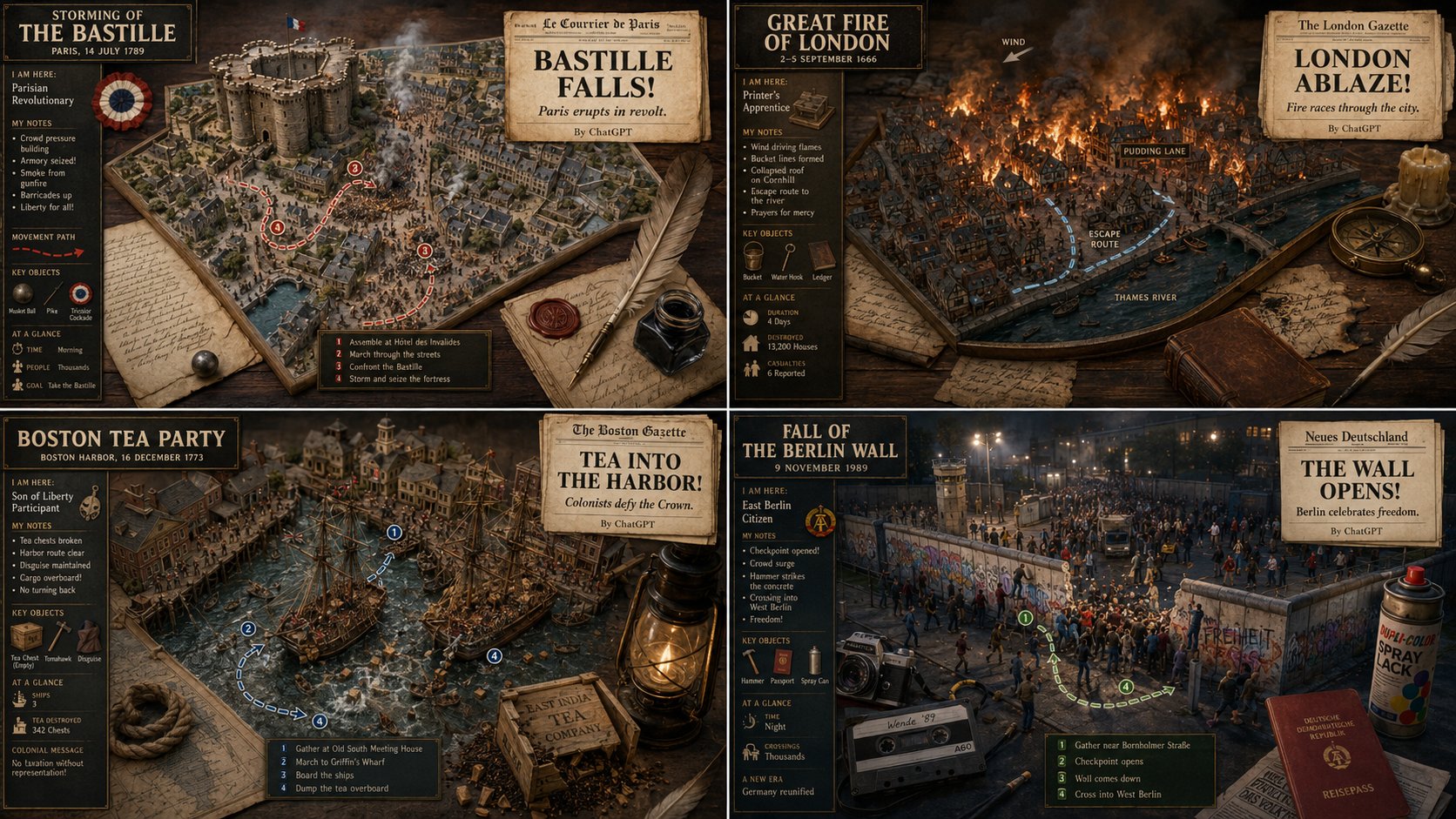
2x2 grid, 16:9, do this for 4 famous historical events: Render_Target = ( 3D_Diorama_Map_Of_[HISTORICAL_EVENT]_In_[CITY] * 1.2 ) + ( First-Person_Account_Infographic_UI_From_The_Perspective_Of_[ROLE] * 1.5 ) + ( Period-Accurate_Studio_Background_With_[ERA]_Artifacts * 1.0 ) + ( Newspaper_Headline_Generator_Widget_With_Your_Byline * 0.8 ) - ( Generic_Time_Machine_Gears_And_Clock_Dials / 3.0 ) - ( Anachronistic_Props_From_Wrong_Decade / 2.5 ) - ( Flat_Wikipedia_Timeline_Graphic / 2.0 )